Bluetooth speakers offer unparalleled portability and convenience, allowing us to carry our favorite tunes wherever we go. But what happens when your speaker doesn’t have a clear display to show its battery life? It’s a common dilemma, leaving many wondering if their speaker is about to die mid-song. Knowing how to accurately check your speaker’s battery level, even without a screen, is crucial for uninterrupted listening and maintaining battery health. This guide will walk you through various methods, from deciphering indicator lights to leveraging your connected devices and companion apps, ensuring you’re never caught off guard by a dead battery again.
Understanding Your Speaker’s Built-in Indicators
Many Bluetooth speakers, especially those designed for portability and ruggedness, forgo a screen in favor of simpler, more robust designs. Yet, they still provide clever ways to communicate their battery status directly.
LED Lights: Your First Clue
The most common method for checking battery life on screenless speakers involves their LED indicator lights. These small, often subtle lights are engineered to convey a surprising amount of information through their colors and patterns.
- Color Codes: Different colors typically signify different battery states. A green light often indicates a full or nearly full charge, providing peace of mind for extended listening sessions. Yellow or amber lights usually act as a gentle warning, signaling that the battery is moderately low and it might be wise to start thinking about recharging. A red light, especially if it’s blinking, is almost universally a critical warning: your battery is critically low and needs immediate charging. On the other hand, a blue light often relates to Bluetooth connection status rather than battery.
- Blinking Patterns: Beyond static colors, the way an LED light blinks can also tell a story. A slowly blinking red light frequently means the battery is dangerously low, urging you to find a power source. During charging, you might see lights blink sequentially or pulse to indicate the charging progress, with a solid green or lights turning off altogether signifying a full charge.
- Multiple LEDs/Bars: Some speakers feature a series of multiple small LED lights, often four or five. Each illuminated light typically represents a percentage increment of the battery’s capacity, such as 20% or 25%. For example, if three out of five lights are on, your speaker has approximately 60% battery remaining. When all lights are solid, the speaker is fully charged.
|
Our Picks for the Best Bluetooth speaker in 2026
As an Amazon Associate I earn from qualifying purchases.
|
||
| Num | Product | Action |
|---|---|---|
| 1 | Anker Soundcore 2 Portable Bluetooth Speaker with Stereo Sound, Bluetooth 5, Bassup, IPX7 Waterproof, 24-Hour Playtime, Wireless, Speaker for Home, Outdoors, Travel |

|
| 2 | Anker Soundcore 2 Portable Bluetooth Speaker with Stereo Sound, Bluetooth 5, Bassup, IPX7 Waterproof, 24-Hour Playtime, Wireless, Speaker for Home, Outdoors, Travel |
|
| 3 | Bluetooth Speaker with HD Sound, Portable Wireless, IPX5 Waterproof, Up to 20H Playtime, TWS Pairing, BT5.3, for Home/Party/Outdoor/Beach, Electronic Gadgets, Birthday Gift (Black) |
|
| 4 | Bluetooth Speaker with HD Sound, Portable Wireless, IPX5 Waterproof, Up to 20H Playtime, TWS Pairing, BT5.3, for Home/Party/Outdoor/Beach, Electronic Gadgets, Birthday Gift (Red) |
|
| 5 | Bluetooth Speaker with HD Sound, Portable Wireless, IPX5 Waterproof, Up to 20H Playtime, TWS Pairing, BT5.3, for Home/Party/Outdoor/Beach, Electronic Gadgets, Birthday Gift (Teal) |
|
| 6 | Bluetooth Speaker with HD Sound, Portable Wireless, IPX5 Waterproof, Up to 20H Playtime, TWS Pairing, BT5.3, for Home/Party/Outdoor/Beach, Electronic Gadgets, Birthday Gift (Blue) |
|
| 7 | Soundcore Anker 2 Portable Bluetooth Speaker with Stereo Sound, Bluetooth 5, Bassup, IPX7 Waterproof, 24-Hour Playtime, Wireless, Speaker for Home, Outdoors, Travel |
|
| 8 | Anker Soundcore 2 Portable Bluetooth Speaker with Stereo Sound, Bluetooth 5, Bassup, IPX7 Waterproof, 24-Hour Playtime, Wireless, Speaker for Home, Outdoors, Travel |
|
| 9 | Bluetooth Speaker with HD Sound, Portable Wireless, IPX5 Waterproof, Up to 20H Playtime, TWS Pairing, BT5.3, for Home/Party/Outdoor/Beach, Electronic Gadgets, Birthday Gift (Pink) |
|
| 10 | Anker Soundcore 2 Portable Bluetooth Speaker with Stereo Sound, Bluetooth 5, Bassup, IPX7 Waterproof, 24-Hour Playtime, Wireless, Speaker for Home, Outdoors, Travel- Navy Blue |
|
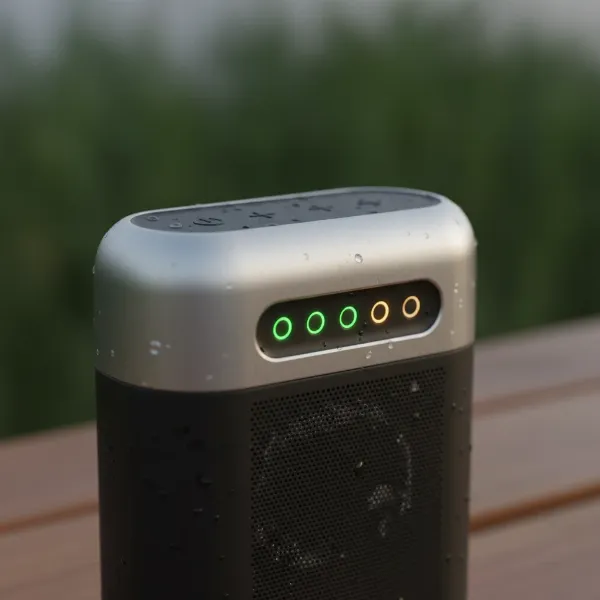 A portable Bluetooth speaker with multiple LED lights indicating its battery level.
The ultimate key to decoding these indicators is your user manual. Every speaker model can have unique light patterns and color meanings, so a quick check of the manual will provide the most accurate information specific to your device. Don’t underestimate this valuable resource!
Audio Prompts and Voice Assistants
Beyond visual cues, many modern Bluetooth speakers incorporate audible notifications to keep you informed about their status, including battery levels. This hands-free approach is especially convenient when you’re busy or the speaker isn’t within easy sight.
Some speakers, such as certain Ultimate Ears models, allow you to press a specific combination of buttons—often the volume up and down buttons simultaneously—to trigger an audio message that announces the current battery level. This can be a straightforward “Battery High,” “Battery Medium,” or “Please Charge Battery” message, or even a more precise percentage. Other speakers might offer voice assistant integration where you can ask, “What’s the battery level?” and receive a verbal response. These prompts remove all guesswork, giving you clear, instantaneous feedback.
Leveraging Your Connected Devices
Your smartphone, tablet, or computer, when connected to your Bluetooth speaker, often acts as a secondary display for its battery life. This is one of the most reliable ways to get a precise battery reading without a screen on the speaker itself.
Checking Battery on Your Smartphone or Tablet
Most modern smartphones and tablets, whether running Android or iOS, are designed to display the battery status of connected Bluetooth devices.
Android Devices
For Android users, several convenient options exist to monitor your speaker’s power:
- Bluetooth Settings Menu: Navigate to your phone’s “Settings,” then “Connected devices,” and tap “Bluetooth.” Here, you’ll usually see a list of your paired devices, and next to your connected Bluetooth speaker, a battery percentage or an icon indicating its charge level may be displayed.
- Quick Settings Panel/Notification Shade: Many Android versions incorporate a quick battery indicator for connected Bluetooth devices directly in the notification shade or quick settings panel. Swipe down from the top of your screen, and you might see the speaker’s battery percentage listed alongside the Bluetooth icon or within a “Device Control” menu.
- Widgets: For a persistent view, some Android devices allow you to add a “Devices” or “Battery” widget to your home screen. This widget can show the battery levels of all currently connected Bluetooth accessories at a glance.
It’s important to note that very old or extremely low-budget Bluetooth speakers might not transmit their battery data effectively to your phone, in which case these methods may not work. Additionally, if you have multiple Bluetooth devices connected simultaneously, your phone might only display the battery of the first connected device or require you to navigate deeper into settings.
iOS Devices (iPhone/iPad)
If you’re an iPhone or iPad user, checking your speaker’s battery is often intuitive:
- Battery Widget: The easiest way is to add the “Batteries” widget to your Today View or home screen. This widget automatically displays the battery levels of your iPhone, Apple Watch, AirPods, and any other connected Bluetooth devices, including your speaker, in a clear percentage format.
- Bluetooth Settings: Go to “Settings,” then “Bluetooth.” Your connected speaker will appear in the list, often with its current battery percentage next to its name.
- Control Center: On newer iPhones (without a home button), swipe down from the top-right corner to open the Control Center. On iPhones with a home button, swipe up from the bottom of the screen. While not always a percentage, a small battery icon might appear next to the Bluetooth icon, giving you a quick visual cue.
Monitoring Battery on Your Computer (Windows/macOS)
Your laptop or desktop computer can also provide battery status updates for connected Bluetooth speakers.
- Windows: On Windows 10 and 11, you can often find battery information by going to “Settings” > “Devices” > “Bluetooth & other devices.” Your speaker should be listed, and if it supports reporting battery levels, the percentage will be shown. Some third-party applications, like “Bluetooth Battery Monitor,” can also provide a more consolidated view of all your Bluetooth device batteries directly from your taskbar.
- macOS: For Mac users, click the Bluetooth icon in the menu bar at the top of your screen. Hover over your connected Bluetooth speaker, and a dropdown menu will often reveal its current battery percentage.
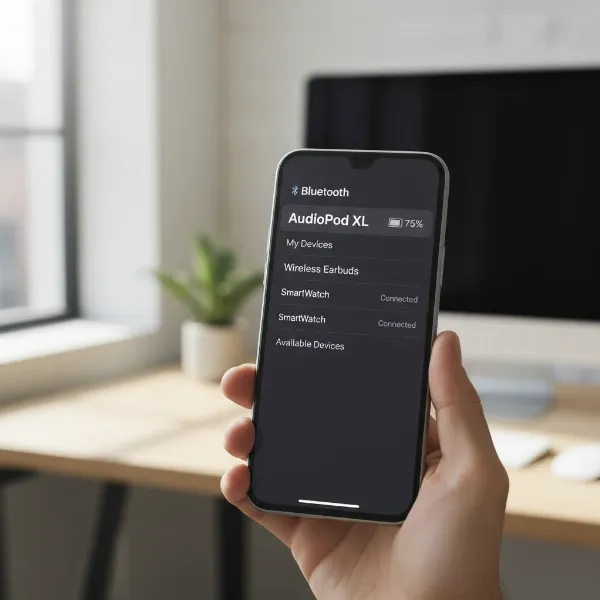 Smartphone screen displaying the battery percentage of a connected Bluetooth speaker.
Companion Mobile Applications
Many major Bluetooth speaker brands, like JBL, Sony, Bose, and Ultimate Ears, develop dedicated companion mobile applications. These apps are invaluable for managing your speaker and often provide the most accurate and detailed battery information.
- Detailed Percentage: After downloading and pairing your speaker with its official app (e.g., JBL Portable, Sony Music Center, UE Boom), you’ll typically find a clear, precise battery percentage displayed prominently on the app’s main screen or within a dedicated settings tab.
- Estimated Playtime: Some apps go a step further, offering an estimated remaining playback time based on your current battery level and usage patterns.
- Notifications: These apps can also be configured to send push notifications when your speaker’s battery is running low, giving you ample warning before it completely drains.
Always check if your speaker manufacturer offers a companion app. It’s often the best way to unlock all your speaker’s features and keep a close eye on its power status.
General Tips for Managing Bluetooth Speaker Battery Life
Knowing your speaker’s battery level is only half the battle; understanding how to optimize and maintain its battery life is equally important for a lasting audio experience.
- Factors Affecting Battery Life: Several elements can influence how quickly your speaker’s battery drains. Playing music at higher volumes significantly increases power consumption. Similarly, maintaining a greater distance between your speaker and the connected device forces the Bluetooth radio to work harder, using more power. Even the type of music—bass-heavy tracks, for instance—can put more strain on the amplifier and battery.
- Optimal Charging Practices: Avoid regularly draining your speaker’s battery completely to 0% and try not to leave it plugged in at 100% for extended periods, as this can degrade battery health over time. Charging your speaker when it reaches around 20-30% and unplugging it once it’s full is generally a good practice.
- Recognizing a Full Charge: When charging, indicator lights will usually change their pattern or color. A common indication of a full charge is when the charging LED turns a solid green, or, in some cases, all indicator lights simply turn off. Referencing your manual for specific charging light behavior is always recommended.
“A well-maintained battery not only ensures longer playback but also extends the overall lifespan of your Bluetooth speaker. Treat your battery with care, and it will keep the music flowing for years.”
Conclusion
Even without a fancy screen, checking the battery level on your Bluetooth speaker is straightforward once you know where to look. From interpreting the subtle language of LED indicator lights and listening for audio prompts to leveraging the powerful battery displays on your connected smartphone, tablet, or computer, you have a wealth of options. Don’t forget the invaluable insights provided by dedicated companion apps, which often offer the most precise readings. By understanding these methods and adopting smart charging habits, you can confidently manage your speaker’s power, ensuring your soundtracks are always ready when you are.
Which of these battery-checking methods do you find most useful for your daily listening?
Frequently Asked Questions
How do I know if my Bluetooth speaker is fully charged?
A fully charged Bluetooth speaker typically indicates its status by the charging LED turning a solid green, or in some models, all indicator lights will simply turn off once charging is complete. Always consult your speaker’s user manual for specific details, as visual cues can vary by brand and model.
Why doesn’t my phone show the exact battery percentage of my Bluetooth speaker?
Some Bluetooth speakers, especially older models or those using less advanced Bluetooth technology, may not transmit precise battery percentage data to your phone. Your phone might only show a generic battery icon or no indicator at all if the speaker lacks the capability to report this information.
Can I check my Bluetooth speaker’s battery if it’s not connected to a device?
Yes, you often can. Many speakers have built-in methods, such as pressing a specific button combination (e.g., volume up and down) to trigger an audio prompt or illuminate indicator lights that show the current battery level, even when not actively paired with another device.
Do all Bluetooth speakers have companion apps for battery monitoring?
No, not all Bluetooth Speakers have dedicated companion apps. This feature is more common with speakers from larger brands like JBL, Sony, or Ultimate Ears. Check your speaker’s manufacturer website or product description to see if an app is available for your model.