Dust off your cherished vintage audio system and prepare to unlock a new dimension of listening freedom. While your classic speakers and stereo receivers deliver unparalleled warmth and depth, they often lack the modern convenience of wireless connectivity. But what if you could stream the rich sound of your vinyl collection, classic CDs, or favorite radio stations directly to your Bluetooth headphones or a contemporary wireless speaker in another room? This guide will show you exactly how to achieve that, transforming your traditional setup into a versatile audio hub using a simple Bluetooth transmitter.
Understanding Bluetooth Transmitters
A Bluetooth transmitter is a clever device designed to bridge the gap between your non-Bluetooth audio equipment and your wireless Bluetooth listening devices. Simply put, it takes an analog audio signal from a source (like your old stereo receiver) and converts it into a digital Bluetooth signal, which can then be sent wirelessly to a compatible Bluetooth speaker or a pair of headphones.
It’s crucial to distinguish between a Bluetooth transmitter and a Bluetooth receiver. A transmitter sends audio out from a non-Bluetooth source (like your vintage stereo) to a Bluetooth-enabled output device (like headphones). Conversely, a receiver gets audio from a Bluetooth source (like your smartphone) and feeds it into a non-Bluetooth system (like your old amplifier to play through its wired speakers). For our goal – sending audio from your old stereo to new Bluetooth devices – you need a Bluetooth transmitter.
The primary benefit of integrating a Bluetooth transmitter is to preserve your beloved vintage gear while embracing wireless convenience. Imagine listening to your carefully curated record collection on noise-canceling Bluetooth headphones, or piping the warm sound of your classic FM tuner to a portable Bluetooth speaker out on the patio. A transmitter makes these scenarios a reality, without compromising your existing setup.
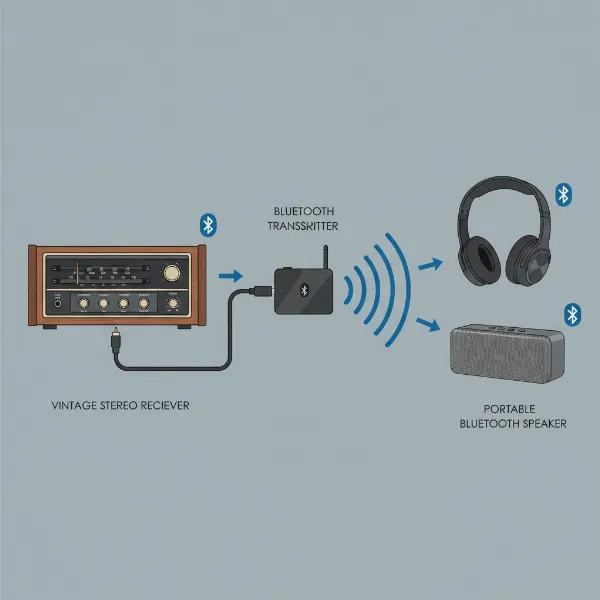 Diagram illustrating a Bluetooth transmitter connecting a vintage stereo receiver to modern Bluetooth headphones and a speaker.
Essential Gear for Your Wireless Upgrade
Before diving into the setup, gather the following components to ensure a smooth transition to wireless audio:
- Bluetooth Transmitter: This is the core component. Transmitters come in various forms, offering different input options (3.5mm AUX, RCA, optical), Bluetooth versions (e.g., 5.0, 5.2), and advanced audio codecs (like aptX Low Latency).
- Your Old Stereo Receiver/Amplifier: This is the heart of your vintage audio system. It’s where your traditional audio sources (turntable, CD player, tape deck) connect, and it provides the audio output we’ll use.
- Audio Cables: Depending on the available output ports on your stereo and input ports on your transmitter, you might need:
- A 3.5mm AUX cable (male-to-male)
- RCA stereo cables (red and white connectors)
- An RCA to 3.5mm adapter cable
- A Digital Optical (Toslink) cable (less common on truly old gear, but possible on some “vintage” digital components)
- Bluetooth-Enabled Receiving Device: This is where your audio will ultimately play. This could be a pair of Bluetooth headphones, a portable Bluetooth speaker, a Bluetooth soundbar, or even another Bluetooth-enabled stereo system.
- Power Source for the Transmitter: Most transmitters are powered via a USB port (which can be plugged into a wall adapter) or directly into a wall outlet.
Step-by-Step Guide: Connecting Your Bluetooth Transmitter
Transforming your old stereo into a Bluetooth streaming hub is a straightforward process. Follow these steps to get your vintage sound going wireless:
Step 1: Identify Audio Outputs on Your Old Stereo System
The first crucial step is to locate the available audio output ports on the back or front of your stereo receiver or amplifier. These ports are where the audio signal exits your system.
- Headphone Jack (3.5mm): Often found on the front panel. This is the simplest connection method, but keep in mind that using the headphone jack usually mutes your main wired speakers.
- RCA Audio Outputs (Line Out, Tape Out, Pre-Out): These are typically colored red and white (or sometimes black). You’ll find them on the back of your receiver.
- Tape Out/Rec Out: These outputs send a line-level audio signal that is unaffected by the main volume control, making them ideal for connecting a transmitter. Your main speakers will continue to play.
- Pre-Out: If your receiver has “Pre-Out” jacks (often paired with “Main-In”), these also provide a line-level output, usually affected by the main volume control.
- Digital Optical/Coaxial Output (SPDIF): Found on more modern “vintage” equipment. If your receiver has these, and your transmitter supports them, they can offer excellent digital audio quality.
|
Our Picks for the Best Bluetooth speaker in 2026
As an Amazon Associate I earn from qualifying purchases.
|
||
| Num | Product | Action |
|---|---|---|
| 1 | Anker Soundcore 2 Portable Bluetooth Speaker with Stereo Sound, Bluetooth 5, Bassup, IPX7 Waterproof, 24-Hour Playtime, Wireless, Speaker for Home, Outdoors, Travel |

|
| 2 | Bluetooth Speaker with HD Sound, Portable Wireless, IPX5 Waterproof, Up to 20H Playtime, TWS Pairing, BT5.3, for Home/Party/Outdoor/Beach, Electronic Gadgets, Birthday Gift (Pink) |
|
| 3 | Bluetooth Speaker with HD Sound, Portable Wireless, IPX5 Waterproof, Up to 20H Playtime, TWS Pairing, BT5.3, for Home/Party/Outdoor/Beach, Electronic Gadgets, Birthday Gift (Red) |
|
| 4 | Anker Soundcore 2 Portable Bluetooth Speaker with Stereo Sound, Bluetooth 5, Bassup, IPX7 Waterproof, 24-Hour Playtime, Wireless, Speaker for Home, Outdoors, Travel |
|
| 5 | Bluetooth Speaker with HD Sound, Portable Wireless, IPX5 Waterproof, Up to 20H Playtime, TWS Pairing, BT5.3, for Home/Party/Outdoor/Beach, Electronic Gadgets, Birthday Gift (Black) |
|
| 6 | Soundcore Anker 2 Portable Bluetooth Speaker with Stereo Sound, Bluetooth 5, Bassup, IPX7 Waterproof, 24-Hour Playtime, Wireless, Speaker for Home, Outdoors, Travel |
|
| 7 | Bluetooth Speaker with HD Sound, Portable Wireless, IPX5 Waterproof, Up to 20H Playtime, TWS Pairing, BT5.3, for Home/Party/Outdoor/Beach, Electronic Gadgets, Birthday Gift (Blue) |
|
| 8 | Anker Soundcore 2 Portable Bluetooth Speaker with Stereo Sound, Bluetooth 5, Bassup, IPX7 Waterproof, 24-Hour Playtime, Wireless, Speaker for Home, Outdoors, Travel |
|
| 9 | Bluetooth Speaker with HD Sound, Portable Wireless, IPX5 Waterproof, Up to 20H Playtime, TWS Pairing, BT5.3, for Home/Party/Outdoor/Beach, Electronic Gadgets, Birthday Gift (Teal) |
|
| 10 | Anker Soundcore 2 Portable Bluetooth Speaker with Stereo Sound, Bluetooth 5, Bassup, IPX7 Waterproof, 24-Hour Playtime, Wireless, Speaker for Home, Outdoors, Travel- Navy Blue |
|
Choose the output that best suits your needs. For the highest flexibility, a “Tape Out” or “Line Out” is generally recommended as it allows simultaneous playback through your wired speakers and your new Bluetooth device.
Step 2: Connect the Transmitter to Your Stereo System
Once you’ve identified the appropriate output, connect your Bluetooth transmitter using the correct audio cable:
- For 3.5mm Headphone Jack: Plug one end of a 3.5mm male-to-male audio cable into your stereo’s headphone jack and the other end into the 3.5mm input on your Bluetooth transmitter.
- For RCA Audio Outputs: Use an RCA stereo cable. Plug the red and white (or black) connectors into the corresponding “Tape Out,” “Line Out,” or “Pre-Out” jacks on your stereo. Connect the other end of the RCA cable to the RCA inputs on your transmitter. If your transmitter only has a 3.5mm input, use an RCA-to-3.5mm adapter cable.
- For Digital Optical/Coaxial Output: Connect a digital optical (Toslink) cable or a digital coaxial cable from your stereo’s digital output to the corresponding input on your transmitter.
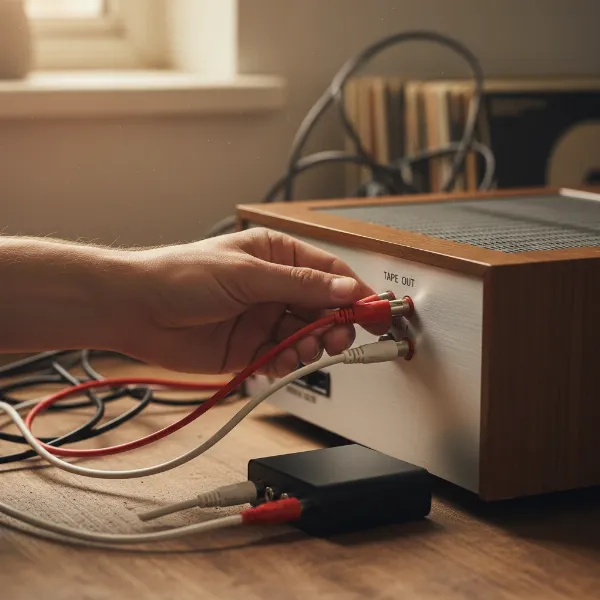 Hands connecting RCA cables from vintage stereo to a Bluetooth transmitter for audio streaming.
Step 3: Power On the Bluetooth Transmitter
Plug your Bluetooth transmitter into a power source. Most transmitters come with a USB cable that can be connected to a USB wall adapter (like a phone charger) or a powered USB port on another device. Some may plug directly into an AC outlet. Ensure the transmitter is powered on, and any indicator lights confirm it’s ready.
Step 4: Pair the Transmitter with Your Bluetooth Device
Now it’s time to establish the wireless connection:
- Activate Pairing Mode on the Transmitter: Refer to your transmitter’s manual. Typically, this involves pressing and holding a dedicated “pairing” button until an LED indicator flashes, signaling it’s in pairing mode.
- Activate Pairing Mode on Your Bluetooth Receiving Device: Put your Bluetooth headphones or speaker into pairing mode. Again, this usually involves pressing and holding a button until an indicator light flashes or an audio cue confirms.
- Allow Devices to Connect: Place the transmitter and your receiving Bluetooth device relatively close to each other. They should automatically detect and pair. Once connected, the indicator lights on both devices will usually change to a solid color.
Step 5: Select Input on Your Old Stereo and Play Audio
With the transmitter and receiving device paired, you’re almost ready to enjoy your music wirelessly:
- Select the Audio Source: On your stereo receiver, select the input source you wish to transmit (e.g., “Phono” for your turntable, “CD,” “Tuner,” or “Tape”).
- Start Playback: Begin playing audio from your chosen source.
- Adjust Volume: Start with the volume low on both your stereo system and your Bluetooth receiving device. Gradually increase the volume on your stereo and then fine-tune the listening level using the controls on your Bluetooth headphones or speaker.
Important Considerations for Optimal Performance
To ensure you get the best possible experience when transmitting audio from your old speakers, keep these factors in mind:
- Audio Quality (Codecs): Modern Bluetooth transmitters support advanced audio codecs like aptX, aptX HD, or LDAC. If both your transmitter and your receiving Bluetooth device support the same high-quality codec, you’ll experience superior sound fidelity and potentially lower latency.
- Range and Interference: Bluetooth has a limited range, typically around 30 feet (10 meters) indoors. Walls, furniture, and other electronic devices can interfere with the signal. Position your transmitter in a clear line of sight to your receiving device for the most stable connection.
- Power Source: Ensure your transmitter has a stable power supply. Some battery-powered transmitters are available, but a dedicated wall adapter often provides more consistent performance.
- Simultaneous Output: As mentioned, using “Tape Out” or “Line Out” on your stereo allows you to play audio through both your wired speakers and your Bluetooth device concurrently. Using the headphone jack usually mutes the main speakers.
- Volume Control: The volume from your stereo’s output can significantly impact the sound quality. Avoid maxing out the volume on your stereo; instead, find a balanced level and then use your Bluetooth device’s volume controls for fine adjustments.
- Dual Link Feature: Some advanced Bluetooth transmitters offer a “dual link” or “multi-pair” feature, allowing them to transmit audio to two Bluetooth headphones or speakers simultaneously. This is great for shared listening experiences.
Troubleshooting Common Issues
Even with a straightforward setup, you might encounter a few hiccups. Here’s how to address common issues:
- No Sound:
- Check all cable connections: Ensure they are fully plugged in.
- Verify input/output selection: Make sure your stereo is playing the correct source and the transmitter is connected to a live output.
- Volume levels: Turn up the volume on your stereo, transmitter (if it has its own control), and your Bluetooth receiving device.
- Pairing: Confirm the transmitter and receiving device are successfully paired. Try re-pairing them.
- Connection Drops/Interference:
- Proximity: Bring the transmitter and Bluetooth device closer together.
- Obstacles: Remove any physical obstructions between the devices.
- Interference: Move the devices away from other electronics (Wi-Fi routers, microwaves, cordless phones) that might cause interference.
- Poor Audio Quality:
- Source quality: Ensure the audio source itself (vinyl, CD) is clean and of good quality.
- Cables: Try different audio cables to rule out faulty wiring.
- Codecs: If your devices support aptX or other high-quality codecs, ensure they are enabled.
- Volume mismatch: Avoid setting the stereo’s output volume too high, which can cause distortion.
- Latency (Audio Delay):
- Codec support: Look for transmitters and receivers that support aptX Low Latency. This codec significantly reduces delay, making it ideal for watching videos or gaming. Not all devices support it, so check compatibility.
Conclusion
Revitalizing your classic audio system with a Bluetooth transmitter is an excellent way to blend the best of both worlds: the rich, authentic sound of vintage equipment with the freedom and convenience of modern wireless technology. By understanding the simple setup process and considering key factors like connection types and audio codecs, you can effortlessly stream your favorite analog tunes to your Bluetooth headphones or speakers.
Don’t let your treasured gear remain confined to a single room or limited to wired connections. Embrace the future without abandoning the past, and rediscover your music library with newfound versatility. What classic albums or audio sources are you most excited to stream wirelessly?
Frequently Asked Questions
Can I use a Bluetooth receiver instead of a transmitter for this purpose?
No, a Bluetooth receiver serves the opposite function. A receiver brings wireless audio into your old stereo from a device like your phone, playing it through your stereo’s wired speakers. A transmitter sends audio from your old stereo to external Bluetooth headphones or speakers.
Which connection type is best: RCA or headphone jack?
For optimal sound quality and flexibility, RCA “Tape Out” or “Line Out” connections are generally preferred. They provide a clean, line-level signal that doesn’t usually mute your main speakers. The headphone jack is convenient but often sacrifices some sound quality and mutes your primary speakers.
Will a Bluetooth transmitter affect my audio quality?
The impact on audio quality depends on the transmitter and receiver’s Bluetooth versions and supported audio codecs. High-quality transmitters with codecs like aptX, aptX HD, or LDAC can transmit near CD-quality audio. Basic transmitters might have a slight, but often negligible, decrease in fidelity for casual listening.
Can I connect multiple Bluetooth headphones to one transmitter?
Some advanced Bluetooth transmitters feature a “dual link” or “multi-pair” function, allowing them to pair with and transmit audio to two Bluetooth headphones or speakers simultaneously. Check the product specifications for this capability.
Do I need an amplifier for my old speakers when using a transmitter?
Yes, your old speakers still need to be powered by an amplifier or receiver. The Bluetooth transmitter connects to the output of your existing amplifier/receiver, taking the audio signal from it. It does not power your passive speakers directly.