Imagine your favorite music flowing seamlessly from room to room, creating the perfect ambiance whether you’re hosting a party, tackling chores, or simply unwinding after a long day. This vision of a connected home audio experience is precisely what multi-room speaker systems offer. While “Bluetooth” is a common term in wireless audio, true multi-room systems often leverage Wi-Fi for superior range, stability, and higher-fidelity sound, with Bluetooth serving as a versatile secondary connection for individual speaker use or localized pairing. This guide, drawing on over a decade of hands-on experience, will help you navigate the exciting world of multi-room speaker systems, ensuring you choose the perfect setup to fill your home with synchronized sound.
Understanding Multi-Room Speaker Systems
Multi-room audio systems allow you to play music across multiple speakers in different rooms, all controlled from a single device like your smartphone or tablet. The magic lies in their connectivity and intelligent software.
Wi-Fi-Based Multi-Room Systems
These are the backbone of most robust multi-room audio setups. They connect to your home Wi-Fi network, allowing for a wider range, greater bandwidth, and higher audio quality compared to standard Bluetooth connections.
- Pros:
- Extended Range: Music can play across your entire home, limited only by your Wi-Fi signal.
- Superior Audio Quality: Wi-Fi offers higher bandwidth, supporting lossless audio streaming for a richer listening experience.
- Independent Control: Play the same song everywhere or different music in different rooms, all managed through a dedicated app.
- Scalability: Easily add more speakers to expand your system as needed.
- Integration: Often compatible with smart home ecosystems like AirPlay 2, Google Cast, Alexa, and Google Assistant.
- Cons:
- Network Dependency: Relies on a strong Wi-Fi signal; interference can cause dropouts.
- Higher Cost: Generally more expensive than basic Bluetooth speakers.
- Setup Complexity: Initial setup might require a bit more technical know-how than simple Bluetooth pairing.
- Brand Ecosystems: Many systems are tied to specific brands (e.g., Sonos, Denon HEOS), limiting mix-and-match options.
|
Our Picks for the Best Bluetooth speaker in 2026
As an Amazon Associate I earn from qualifying purchases.
|
||
| Num | Product | Action |
|---|---|---|
| 1 | Bluetooth Speaker with HD Sound, Portable Wireless, IPX5 Waterproof, Up to 20H Playtime, TWS Pairing, BT5.3, for Home/Party/Outdoor/Beach, Electronic Gadgets, Birthday Gift (Red) |

|
| 2 | Anker Soundcore 2 Portable Bluetooth Speaker with Stereo Sound, Bluetooth 5, Bassup, IPX7 Waterproof, 24-Hour Playtime, Wireless, Speaker for Home, Outdoors, Travel |
|
| 3 | Anker Soundcore 2 Portable Bluetooth Speaker with Stereo Sound, Bluetooth 5, Bassup, IPX7 Waterproof, 24-Hour Playtime, Wireless, Speaker for Home, Outdoors, Travel |
|
| 4 | Anker Soundcore 2 Portable Bluetooth Speaker with Stereo Sound, Bluetooth 5, Bassup, IPX7 Waterproof, 24-Hour Playtime, Wireless, Speaker for Home, Outdoors, Travel- Navy Blue |
|
| 5 | Bluetooth Speaker with HD Sound, Portable Wireless, IPX5 Waterproof, Up to 20H Playtime, TWS Pairing, BT5.3, for Home/Party/Outdoor/Beach, Electronic Gadgets, Birthday Gift (Blue) |
|
| 6 | Anker Soundcore 2 Portable Bluetooth Speaker with Stereo Sound, Bluetooth 5, Bassup, IPX7 Waterproof, 24-Hour Playtime, Wireless, Speaker for Home, Outdoors, Travel |
|
| 7 | Bluetooth Speaker with HD Sound, Portable Wireless, IPX5 Waterproof, Up to 20H Playtime, TWS Pairing, BT5.3, for Home/Party/Outdoor/Beach, Electronic Gadgets, Birthday Gift (Black) |
|
| 8 | Bluetooth Speaker with HD Sound, Portable Wireless, IPX5 Waterproof, Up to 20H Playtime, TWS Pairing, BT5.3, for Home/Party/Outdoor/Beach, Electronic Gadgets, Birthday Gift (Teal) |
|
| 9 | Soundcore Anker 2 Portable Bluetooth Speaker with Stereo Sound, Bluetooth 5, Bassup, IPX7 Waterproof, 24-Hour Playtime, Wireless, Speaker for Home, Outdoors, Travel |
|
| 10 | Bluetooth Speaker with HD Sound, Portable Wireless, IPX5 Waterproof, Up to 20H Playtime, TWS Pairing, BT5.3, for Home/Party/Outdoor/Beach, Electronic Gadgets, Birthday Gift (Pink) |
|
Bluetooth Multi-Speaker Pairing (Party/Stereo Modes)
While not a “true” multi-room system in the Wi-Fi sense, many modern Bluetooth speakers offer features like “Party Mode” or “Stereo Pairing.” These allow you to connect two or more compatible speakers (usually from the same brand) to a single Bluetooth source.
- Pros:
- Portability: Often battery-powered, making them ideal for moving around the house or outdoors.
- Simpler Setup: Direct pairing is often quicker for localized listening.
- Affordability: Generally less expensive than Wi-Fi-based multi-room components.
- Cons:
- Limited Range: Bluetooth’s range is significantly shorter than Wi-Fi, typically around 30-60 feet, and can be affected by walls and obstacles.
- Latency Issues: Can sometimes experience minor audio delays between speakers.
- Limited Number of Speakers: Most Bluetooth party modes support a maximum of 2 to 7 speakers.
- Brand-Specific: Interoperability between different brands for these modes is rare.
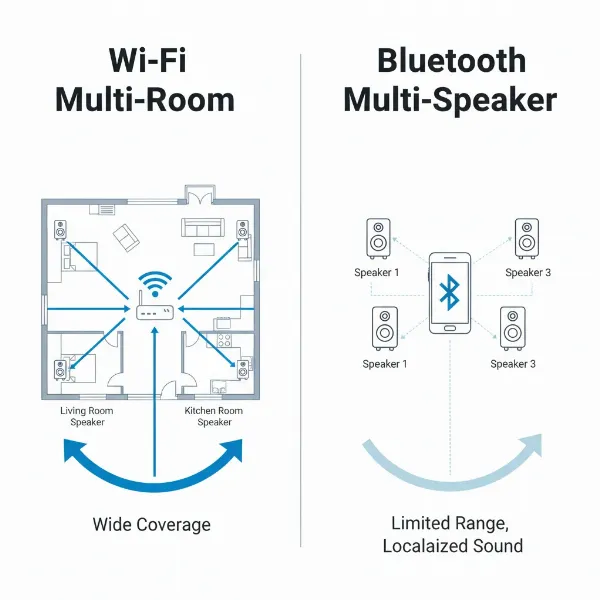 Diagram contrasting Wi-Fi multi-room audio with wider range and a limited Bluetooth multi-speaker setup.
Your Essential Multi-Room Bluetooth Speaker Buying Guide
Choosing the right system requires careful consideration of your lifestyle and priorities.
Determine Your Usage Needs
Before diving into specifications, ask yourself:
- Primary Purpose: Will you mainly use it for background music at home, entertaining guests, outdoor gatherings, or a combination?
- Budget: How much are you willing to invest? Multi-room systems range from budget-friendly smart speakers to premium audiophile setups.
- Essential Features: Do you need waterproofing for bathroom or outdoor use? Is voice control a must-have? How important is portability?
Critical Factors to Consider
- Sound Quality: This is paramount. Look for balanced audio with clear highs, detailed mid-ranges, and rich, defined bass. Many premium systems offer advanced features like spatial audio (e.g., Dolby Atmos) for an immersive experience, and room calibration tools to optimize sound for your specific space.
- Connectivity Options: While the keyword is “Bluetooth,” prioritize Wi-Fi for multi-room functionality. Ensure the system supports essential streaming protocols like AirPlay 2 (for Apple users), Google Cast (for Android users), Spotify Connect, and Tidal Connect. Bluetooth 5.0 or later is beneficial for stable direct connections.
- Ecosystem Compatibility: Decide if you want to commit to a single brand’s ecosystem (e.g., Sonos, Apple HomeKit, Denon HEOS) for seamless integration and future expansion, or if you prefer a more open system that supports universal standards like AirPlay 2 or Google Cast. Mixing brands generally leads to compatibility challenges.
- Ease of Setup and Control: A user-friendly app is crucial for managing your multi-room system, grouping speakers, adjusting volumes, and accessing streaming services. Look for intuitive interfaces and reliable performance. Physical controls on the speakers can also be a convenience.
- Smart Features: Integration with voice assistants like Alexa, Google Assistant, or Siri can add significant convenience, allowing hands-free control of your music and smart home devices.
- Portability vs. Stationary: Many multi-room systems feature a mix of stationary (Wi-Fi only) and portable (Wi-Fi + Bluetooth, battery-powered) speakers, offering flexibility. Consider where each speaker will live and whether it needs to be moved frequently.
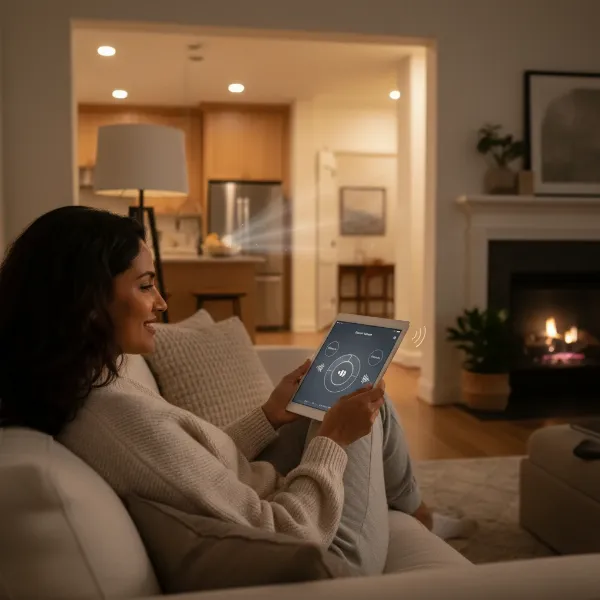 A person comfortably controls multi-room music using a tablet, enjoying synchronized sound throughout their modern home.
Comparing Popular Multi-Room Speaker Brands
The market offers several strong contenders, each with unique strengths:
- Sonos: Often considered the industry leader, Sonos offers a robust and user-friendly ecosystem with a wide range of Wi-Fi speakers, soundbars, and subwoofers. Their app is highly regarded, and sound quality is consistently excellent.
- JBL: Known for powerful, bass-heavy sound, many JBL portable Bluetooth speakers feature “PartyBoost” or “Connect+” to link multiple compatible speakers for synchronized audio in a localized area.
- Bose: Offers premium sound quality and elegant designs. Their “SimpleSync” technology allows pairing compatible Bose speakers for multi-room or stereo listening.
- Apple HomePod: Designed for the Apple ecosystem, HomePod speakers leverage AirPlay 2 for multi-room audio with excellent sound, spatial audio capabilities, and Siri integration.
- Amazon Echo: A budget-friendly entry into smart home audio, Echo devices use Wi-Fi and Alexa to create multi-room groups, though their primary focus is smart assistant functionality rather than audiophile sound quality.
- Denon HEOS: Provides a high-resolution multi-room audio platform with a strong emphasis on sound fidelity and a variety of speaker sizes.
- Audio Pro: Offers stylish speakers with excellent sound and support for multiple multi-room technologies like AirPlay 2, Google Cast, and its own Audio Pro multi-room system.
Multi-Room Bluetooth Speaker System Comparison
| Brand | Model | Price | Key Advantages | Potential Disadvantages |
|---|---|---|---|---|
| JBL | Charge 5 | [Price] | Portable, waterproof, excellent sound, PartyBoost. | Bluetooth-only multi-speaker (not true Wi-Fi multi-room). |
| Sonos | Era 300 | [Price] | Immersive spatial audio, robust Wi-Fi multi-room, wide streaming support. | Premium price, requires Sonos ecosystem. |
| Apple | HomePod 2 | [Price] | Superb sound for Apple users, AirPlay 2, Siri, spatial audio. | Apple ecosystem dependent, no direct physical inputs. |
| Amazon | Echo Dot (5th Gen) | [Price] | Highly affordable, Alexa voice control, easy Wi-Fi multi-room. | Sound quality is basic, lacks physical inputs. |
| Audio Pro | C5 MKII | [Price] | Versatile connectivity, powerful sound, sleek design. | No battery for portability. |
Top Picks: Multi-Room Speakers by Price Segment
Budget-Friendly (Under $100)
For those just dipping their toes into multi-room audio or looking for basic voice-controlled sound, smart speakers offer great value.
- Amazon Echo Dot (5th Generation): An incredibly affordable way to start a multi-room setup, especially if you’re invested in the Alexa ecosystem. It offers surprisingly expansive sound for its size and seamless voice control. While not audiophile-grade, it’s perfect for casual listening and smart home integration.
- Pros: Extremely affordable, excellent Alexa integration, compact design.
- Cons: Basic sound quality, can distort at higher volumes, no physical inputs.
Mid-Range ($100 – $400)
This segment offers a balance of sound quality, features, and affordability, often including portable options.
- Sonos Era 100: A fantastic entry point into the Sonos ecosystem, delivering rich, clear sound that significantly outperforms budget smart speakers. It offers Wi-Fi multi-room, Bluetooth, and voice control, making it a versatile choice.
- Denon Home 150: Part of the HEOS ecosystem, this speaker provides detailed, high-resolution audio with multi-room capabilities and integrates well with various streaming services and voice assistants.
- Pros: Balanced sound, good connectivity (Wi-Fi/Bluetooth), app control, smart features.
- Cons: Can get pricey when building a larger system, some models may require adapters for physical inputs.
Premium (Over $400)
For audiophiles and those seeking the ultimate multi-room experience, these speakers deliver exceptional sound and advanced features.
- Sonos Era 300: A true standout for immersive audio, especially with spatial audio content. Its unique design houses multiple drivers for expansive, room-filling sound, and it seamlessly integrates into a Sonos multi-room setup.
- Apple HomePod 2: If you’re an Apple user, the HomePod 2 offers natural, energetic sound, excellent spatial audio, and robust integration with Apple Music, Siri, and Apple HomeKit. Its real-time sound optimization adjusts to its surroundings.
- Naim Mu-so Qb 2nd Generation: A compact yet powerful option for audiophiles, delivering exceptionally detailed and expressive sound. It offers extensive streaming options and is multi-room ready, perfect for those who prioritize sonic performance.
- Pros: Exceptional sound fidelity, advanced audio technologies (spatial audio, room correction), premium build quality, extensive streaming options.
- Cons: High price point, some systems are ecosystem-locked, larger footprint.
Tips for Using and Maintaining Your Multi-Room Bluetooth Speaker System
To get the most out of your multi-room audio experience, consider these practical tips:
How to Connect Your Speakers
- Wi-Fi Systems: Most systems require you to download a dedicated app (e.g., Sonos app, HEOS app). Follow the in-app instructions to connect each speaker to your home Wi-Fi network and then group them for synchronized playback or assign them to different zones. Firmware updates are often crucial for optimal performance and new features.
- Bluetooth Multi-Speaker: For speakers supporting “Party Mode” or “Stereo Pairing,” connect your primary speaker to your device via Bluetooth. Then, use the speaker’s physical buttons or its companion app to activate the multi-speaker mode and link additional compatible speakers.
How to Optimize Sound Quality
- Placement: Experiment with speaker placement. Avoid placing speakers directly in corners, which can muddy the bass. For stereo pairing, position speakers at least 6-10 feet apart for a wide soundstage. In larger rooms, distribute speakers to eliminate “dead zones.”
- App Equalization (EQ): Many multi-room apps include EQ settings. Don’t be afraid to adjust bass, treble, or even a full graphic EQ to tailor the sound to your room acoustics and personal preferences.
- Room Calibration: Some advanced speakers (like Sonos) offer automatic room calibration features (e.g., Trueplay) that use your smartphone’s microphone to analyze the room and optimize the speaker’s output.
How to Clean and Maintain Your Speakers
- Regular Cleaning: Dust can accumulate on speaker grilles and surfaces. Use a soft, dry cloth for general cleaning. For grilles, a soft brush or a vacuum with a brush attachment on a low setting can remove dust.
- Avoid Liquids: Never spray cleaning solutions directly onto speakers. If needed, dampen a cloth slightly with water and mild soap, then wipe gently.
- Firmware Updates: Always keep your speaker’s firmware updated through the manufacturer’s app. These updates often include performance improvements, bug fixes, and new features.
Conclusion
Creating a multi-room audio system transforms your home into a dynamic soundscape, offering unparalleled convenience and immersion. While standard Bluetooth offers quick, localized connections, Wi-Fi-based systems truly unlock the potential of whole-home audio with superior range and sound quality. From the robust ecosystem of Sonos to the budget-friendly smarts of Amazon Echo and the audiophile-grade performance of Naim, there’s a perfect multi-room solution for every need and budget. By understanding your requirements and the core technologies, you can confidently choose a system that delivers your favorite tunes seamlessly throughout every corner of your living space. Which multi-room speaker system will bring your home to life?
Frequently Asked Questions
What is the difference between multi-room Bluetooth speakers and Wi-Fi speakers?
True multi-room systems primarily use Wi-Fi to connect speakers across your home, offering greater range, higher audio quality, and independent control for different zones. Bluetooth speakers can sometimes link together in “party” or “stereo” modes for localized multi-speaker playback, but they have more limited range and connectivity compared to Wi-Fi-based systems.
Can I mix and match different brands of multi-room speakers?
Generally, no. Most multi-room systems operate within proprietary ecosystems (e.g., Sonos, HEOS), meaning speakers from different brands are usually not directly compatible for synchronized multi-room playback. However, systems supporting universal protocols like Apple AirPlay 2 or Google Cast can sometimes integrate speakers from different manufacturers that support those specific standards.
How many multi-room speakers do I need for my home?
The number of speakers depends on the size and layout of your home, as well as how many areas you want covered. A good starting point is one speaker per main living area or bedroom, plus additional speakers for larger open-plan spaces or outdoor zones. Most systems allow you to start with a few speakers and expand later.
Do multi-room Bluetooth speakers require a special router?
While multi-room systems utilize your existing Wi-Fi, a robust and stable home network is essential for optimal performance. If you have a large home, multiple connected devices, or experience frequent Wi-Fi issues, upgrading to a mesh Wi-Fi system or a high-performance router can significantly improve your multi-room audio experience.
Can multi-room speakers play different music in different rooms?
Yes, this is one of the key advantages of most Wi-Fi-based multi-room systems. Using the dedicated control app, you can typically group speakers to play the same audio synchronously or select different music sources for individual speakers or zones, catering to diverse listening preferences simultaneously.