Few things are as frustrating as when your trusty waterproof speaker, designed for life’s wildest adventures, suddenly has an unresponsive button. Whether it’s the power, volume, or playback control, a stuck button can bring your poolside party or hiking soundtrack to an abrupt halt. As someone who has spent years troubleshooting and repairing Bluetooth speakers, I know the annoyance firsthand. The good news is that many stuck button issues on waterproof speakers can be resolved with a few simple, DIY fixes. Let’s dive in and get your speaker back in perfect working order.
Understanding the Problem: Why Buttons Get Stuck on Waterproof Speakers
Waterproof speakers are built to withstand the elements, but this very resilience can sometimes lead to button issues. The design that keeps water out can also trap other culprits.
Common Causes of Stuck or Unresponsive Buttons:
- Debris Accumulation: The most common offender. Fine sand from the beach, dirt from a trail, grime, or even lint can get lodged in the tiny crevices around the buttons, preventing them from moving freely.
- Sticky Residue: Spilled drinks, sunscreen, or even the natural oils from your hands can leave a sticky film that gums up the button mechanism.
- Internal Pressure or Misalignment: Sometimes, internal components or the rubberized membrane beneath the button can shift or get stuck, especially after a bump or fall.
- Rubber Degradation: Over time, the rubberized coating on some buttons can become tacky or degrade, leading to a sticky feeling, especially if exposed to harsh conditions or certain chemicals.
- Software Glitches: Less common for physical sticking, but an unresponsive button can sometimes be a software issue, requiring a reset.
- Power Supply Issues: In some cases, if the speaker is plugged in and buttons are unresponsive, it might indicate an inadequate power supply, though this typically manifests as general unresponsiveness rather than a physically stuck button.
|
Our Picks for the Best Bluetooth speaker in 2026
As an Amazon Associate I earn from qualifying purchases.
|
||
| Num | Product | Action |
|---|---|---|
| 1 | Bluetooth Speaker with HD Sound, Portable Wireless, IPX5 Waterproof, Up to 20H Playtime, TWS Pairing, BT5.3, for Home/Party/Outdoor/Beach, Electronic Gadgets, Birthday Gift (Black) |

|
| 2 | Bluetooth Speaker with HD Sound, Portable Wireless, IPX5 Waterproof, Up to 20H Playtime, TWS Pairing, BT5.3, for Home/Party/Outdoor/Beach, Electronic Gadgets, Birthday Gift (Blue) |
|
| 3 | Bluetooth Speaker with HD Sound, Portable Wireless, IPX5 Waterproof, Up to 20H Playtime, TWS Pairing, BT5.3, for Home/Party/Outdoor/Beach, Electronic Gadgets, Birthday Gift (Teal) |
|
| 4 | Bluetooth Speaker with HD Sound, Portable Wireless, IPX5 Waterproof, Up to 20H Playtime, TWS Pairing, BT5.3, for Home/Party/Outdoor/Beach, Electronic Gadgets, Birthday Gift (Pink) |
|
| 5 | Bluetooth Speaker with HD Sound, Portable Wireless, IPX5 Waterproof, Up to 20H Playtime, TWS Pairing, BT5.3, for Home/Party/Outdoor/Beach, Electronic Gadgets, Birthday Gift (Red) |
|
| 6 | Anker Soundcore 2 Portable Bluetooth Speaker with Stereo Sound, Bluetooth 5, Bassup, IPX7 Waterproof, 24-Hour Playtime, Wireless, Speaker for Home, Outdoors, Travel |
|
| 7 | Anker Soundcore 2 Portable Bluetooth Speaker with Stereo Sound, Bluetooth 5, Bassup, IPX7 Waterproof, 24-Hour Playtime, Wireless, Speaker for Home, Outdoors, Travel |
|
| 8 | Soundcore Anker 2 Portable Bluetooth Speaker with Stereo Sound, Bluetooth 5, Bassup, IPX7 Waterproof, 24-Hour Playtime, Wireless, Speaker for Home, Outdoors, Travel |
|
| 9 | Anker Soundcore 2 Portable Bluetooth Speaker with Stereo Sound, Bluetooth 5, Bassup, IPX7 Waterproof, 24-Hour Playtime, Wireless, Speaker for Home, Outdoors, Travel- Navy Blue |
|
| 10 | Anker Soundcore 2 Portable Bluetooth Speaker with Stereo Sound, Bluetooth 5, Bassup, IPX7 Waterproof, 24-Hour Playtime, Wireless, Speaker for Home, Outdoors, Travel |
|
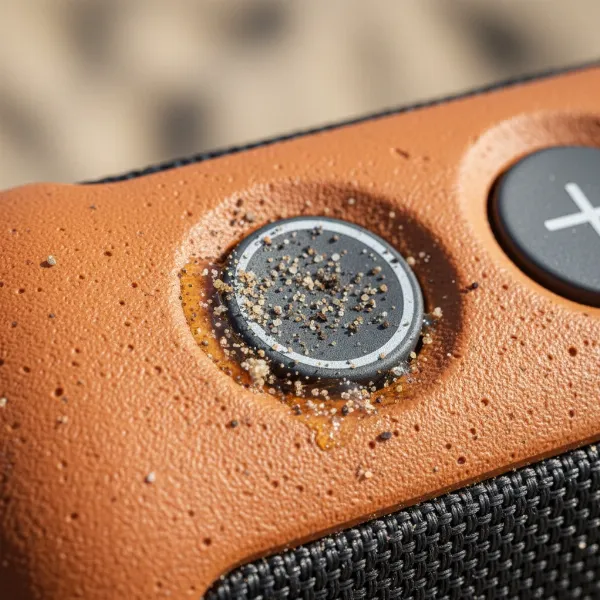 Close-up of a waterproof speaker button surrounded by sand, dirt, and sticky residue.
Waterproof ratings, like IPX7, indicate how well a speaker can resist water. However, these ratings don’t always account for microscopic debris or sticky substances that can affect button functionality without compromising the waterproof seal itself.
Initial Troubleshooting Steps: Before You Grab the Tools
Before attempting more involved fixes, try these simple solutions that can often clear minor issues.
First Aid for Unresponsive Buttons:
- Soft Reset Your Speaker: Many speaker issues are temporary software glitches. Try holding the power button for 10-15 seconds until the speaker turns off and restarts. For some models, there might be a specific button combination (e.g., volume down and power simultaneously) or a small pinhole reset button (often under a rubber flap) that you can press with a paperclip. Consult your speaker’s manual for specific reset instructions.
- Wiggle and Press Repeatedly: Sometimes, a bit of gentle persuasion is all it takes. Press the stuck button firmly but gently, then release it. Repeat this several times, wiggling it slightly from side to side to see if it dislodges any trapped debris.
- Test on Battery Power (If Applicable): If your speaker’s buttons only misbehave when plugged in, try running it solely on battery. An insufficient power supply can sometimes cause erratic behavior.
Tools and Materials You Might Need
Having the right tools makes the job easier and safer. You likely have most of these items around the house:
- Compressed Air: For blowing out loose debris.
- Soft Brush: An old, clean toothbrush or a small paintbrush is ideal for gently scrubbing around button edges.
- 70% Isopropyl Alcohol: A safe and effective cleaner for electronics, as it evaporates quickly and leaves no residue.
- Cotton Swabs or Microfiber Cloth: For applying alcohol and wiping surfaces.
- Warm Water & Mild Dish Soap: For general cleaning of the speaker’s exterior.
- Toothpick or Thin Plastic Tool: To carefully dislodge stubborn debris (use with extreme caution).
- Gloves (Optional): To protect your hands from cleaning agents.
Step-by-Step Guide to Fixing a Stuck Button
Let’s get your button moving again with these methods, starting with the least invasive.
Method 1: Surface Cleaning for Grime and Debris
This is the most common and often effective solution for buttons stuck due to external gunk.
- Power Down and Disconnect: Always turn off your speaker and unplug it from any charging cables to prevent accidental damage or electrical issues.
- Shake Off Loose Particles: Give your speaker a few gentle shakes to dislodge any obvious sand, dust, or dirt. You can also tap it lightly against a soft surface.
- Rinse (for truly waterproof speakers): If your speaker is rated for immersion (e.g., IPX7 or higher), you can gently rinse it under a mild stream of lukewarm fresh water. Avoid high-pressure jets, which can force water or debris into seals. Focus on rinsing the area around the stuck button.
- Brush Away Debris: Use a soft, dry toothbrush or paintbrush to gently sweep around the edges of the stuck button. Work the bristles into the tiny gaps to loosen any trapped sand, dirt, or lint.
- Clean with Isopropyl Alcohol:
- Dampen a cotton swab or the corner of a microfiber cloth with 70% isopropyl alcohol.
- Carefully wipe around the edges of the stuck button, trying to work the alcohol into the gap.
- Press the button repeatedly while cleaning to help the alcohol penetrate and dissolve any sticky residue.
- For stubborn sticky coatings on the button’s surface, you might need a slightly more saturated swab, but ensure no excess liquid pools.
- Dry Thoroughly: Allow the speaker to air dry completely for at least 30 minutes before testing. Isopropyl alcohol evaporates quickly, but ensuring it’s fully dry prevents further issues.
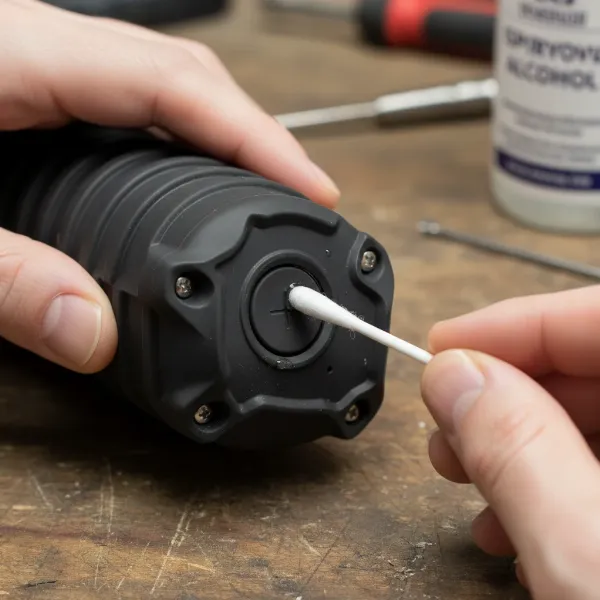 Person cleaning a waterproof speaker button with a cotton swab and isopropyl alcohol.
Method 2: Addressing Debris Underneath the Button
If surface cleaning doesn’t work, debris might be more deeply lodged.
- Compressed Air Blast: After surface cleaning and drying, use compressed air. Hold the can upright and spray short bursts around the button’s perimeter. The goal is to blow out particles, not push them further in. You can also press the button repeatedly while applying air.
- Careful Prying (Extreme Caution): If the button is still stuck, only as a last resort and with extreme care, you can try to gently pry at the very edge of the button with a thin, non-metallic tool like a plastic guitar pick or a sturdy toothpick. The aim is to create a tiny gap to dislodge debris or free a stuck edge.
- WARNING: Be incredibly gentle. Too much force can damage the button, its internal membrane, or compromise the speaker’s waterproof seal. If you feel resistance or see any damage, stop immediately.
Method 3: When Cleaning and Resets Aren’t Enough (Advanced/Internal Issues)
If the button remains stuck after thorough cleaning and resets, the problem might be internal.
- The “Pressure Release” Technique (for some models): For certain speakers, pressing and holding the stuck button for 30 seconds can sometimes release internal pressure or a minor internal jam. After releasing, immediately press it rapidly 10-15 times while applying gentle circular motions. This might free a stuck internal component.
- Consider Professional Repair: If the problem persists, or if you suspect internal damage (e.g., after a drop), it’s often best to seek professional repair. Attempting to open a waterproof speaker can be challenging, often requiring specialized tools and potentially compromising its waterproof integrity and voiding your warranty.
- Check Warranty: Before attempting any invasive repairs, check if your speaker is still under warranty. Most manufacturers will cover defects, and attempting DIY repairs can void that coverage.
Preventive Measures: Keeping Your Buttons Smooth
An ounce of prevention is worth a pound of cure, especially with waterproof speakers.
- Rinse After Exposure: After every beach trip, pool party, or dusty adventure, give your speaker a quick rinse with fresh water and wipe it dry. This prevents corrosive substances like saltwater and fine particles like sand from building up.
- Regular Cleaning: Make it a habit to wipe down your speaker and brush around the buttons monthly, even with casual use.
- Proper Storage: Store your speaker in a clean, dry place, away from excessive heat, humidity, or environments where dust and debris are prevalent. A protective case can be a wise investment.
- Gentle Handling: While robust, avoid dropping your speaker or pressing buttons with excessive force. Gentle, consistent pressure is usually all that’s needed.
Conclusion
A stuck button on your waterproof speaker doesn’t have to spell the end of your musical adventures. By systematically troubleshooting, starting with simple cleaning and resets, you can often restore full functionality. Remember to be patient, gentle, and know when to seek professional help to protect your investment. With these tips, you’ll be back to enjoying seamless control and crystal-clear audio wherever your next adventure takes you.
What common environmental factors do you think most impact your waterproof speaker’s buttons?
Frequently Asked Questions
What kind of alcohol should I use to clean my speaker buttons?
Use 70% isopropyl alcohol, as it is effective at dissolving grime and evaporates quickly without leaving residue, making it safe for electronics.
Can water damage cause buttons to stick on a waterproof speaker?
While waterproof speakers are designed to resist water ingress, prolonged exposure to salt water or chemicals, or damage to the waterproof seal, can lead to corrosion or internal issues that affect button functionality.
How often should I clean my waterproof speaker’s buttons?
It’s recommended to rinse and dry your speaker after every outdoor exposure to elements like sand or saltwater. For general use, a monthly quick clean with a soft brush and isopropyl alcohol can prevent buildup.
Will opening my waterproof speaker to fix a button void the warranty?
Yes, attempting to open most waterproof speakers will void their warranty and can compromise their waterproof integrity. Only attempt this if you’re out of warranty and comfortable with advanced repairs.
My JBL speaker button is stuck, are there specific reset methods?
Yes, JBL speakers often have specific button combinations for resets. For example, some models can be reset by holding the Power button for 10 seconds, or a combination like Bluetooth + Play or Volume Down + Power. Always check your specific model’s manual for the correct sequence.